

- Python
- Node
- Java
你可以在这里找到本教程的完整代码。将你的密钥添加到 将 你可以在这里找到完整的 客户端将会: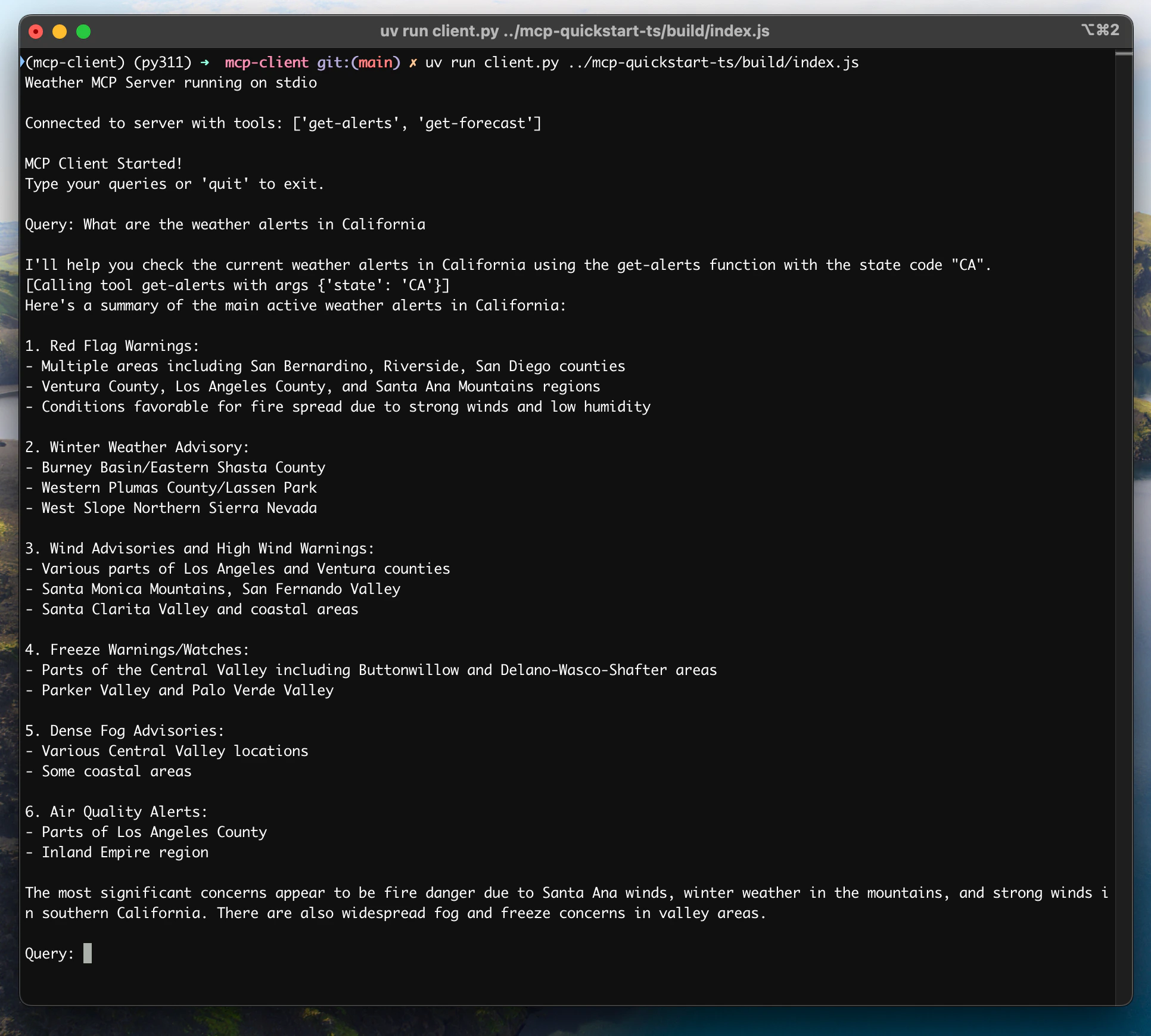
系统要求
开始之前,请确保你的系统满足以下要求:- Mac 或 Windows 电脑
- 安装了最新版本的 Python
- 安装了最新版本的
uv
设置环境
首先,使用uv 创建一个新的 Python 项目:# 创建项目目录
uv init mcp-client
cd mcp-client
# 创建虚拟环境
uv venv
# 激活虚拟环境
# Windows 上:
.venv\Scripts\activate
# Unix 或 MacOS 上:
source .venv/bin/activate
# 安装所需包
uv add mcp anthropic python-dotenv
# 删除样板文件
rm hello.py
# 创建我们的主文件
touch client.py
设置 API 密钥
你需要从 Anthropic Console 获取一个 Anthropic API 密钥。创建一个.env 文件来存储它:# 创建 .env 文件
touch .env
.env 文件中:ANTHROPIC_API_KEY=<你的密钥>
.env 添加到你的 .gitignore:echo ".env" >> .gitignore
确保保护好你的
ANTHROPIC_API_KEY!创建客户端
基本客户端结构
首先,让我们设置导入并创建基本的客户端类:import asyncio
from typing import Optional
from contextlib import AsyncExitStack
from mcp import ClientSession, StdioServerParameters
from mcp.client.stdio import stdio_client
from anthropic import Anthropic
from dotenv import load_dotenv
load_dotenv() # 从 .env 加载环境变量
class MCPClient:
def __init__(self):
# 初始化会话和客户端对象
self.session: Optional[ClientSession] = None
self.exit_stack = AsyncExitStack()
self.anthropic = Anthropic()
# 方法将在这里
服务器连接管理
接下来,我们将实现连接到 MCP 服务器的方法:async def connect_to_server(self, server_script_path: str):
"""连接到 MCP 服务器
参数:
server_script_path: 服务器脚本的路径(.py 或 .js)
"""
is_python = server_script_path.endswith('.py')
is_js = server_script_path.endswith('.js')
if not (is_python or is_js):
raise ValueError("服务器脚本必须是 .py 或 .js 文件")
command = "python" if is_python else "node"
server_params = StdioServerParameters(
command=command,
args=[server_script_path],
env=None
)
stdio_transport = await self.exit_stack.enter_async_context(stdio_client(server_params))
self.stdio, self.write = stdio_transport
self.session = await self.exit_stack.enter_async_context(ClientSession(self.stdio, self.write))
await self.session.initialize()
# 列出可用工具
response = await self.session.list_tools()
tools = response.tools
print("\n已连接到服务器,可用工具:", [tool.name for tool in tools])
查询处理逻辑
现在让我们添加处理查询和工具调用的核心功能:async def process_query(self, query: str) -> str:
"""使用 Claude 和可用工具处理查询"""
messages = [
{
"role": "user",
"content": query
}
]
response = await self.session.list_tools()
available_tools = [{
"name": tool.name,
"description": tool.description,
"input_schema": tool.inputSchema
} for tool in response.tools]
# Initial Claude API call
response = self.anthropic.messages.create(
model="claude-3-5-sonnet-20241022",
max_tokens=1000,
messages=messages,
tools=available_tools
)
# Process response and handle tool calls
tool_results = []
final_text = []
assistant_message_content = []
for content in response.content:
if content.type == 'text':
final_text.append(content.text)
assistant_message_content.append(content)
elif content.type == 'tool_use':
tool_name = content.name
tool_args = content.input
# Execute tool call
result = await self.session.call_tool(tool_name, tool_args)
tool_results.append({"call": tool_name, "result": result})
final_text.append(f"[Calling tool {tool_name} with args {tool_args}]")
assistant_message_content.append(content)
messages.append({
"role": "assistant",
"content": assistant_message_content
})
messages.append({
"role": "user",
"content": [
{
"type": "tool_result",
"tool_use_id": content.id,
"content": result.content
}
]
})
# Get next response from Claude
response = self.anthropic.messages.create(
model="claude-3-5-sonnet-20241022",
max_tokens=1000,
messages=messages,
tools=available_tools
)
final_text.append(response.content[0].text)
return "\n".join(final_text)
交互式聊天界面
现在我们将添加聊天循环和清理功能:async def chat_loop(self):
"""运行交互式聊天循环"""
print("\nMCP 客户端已启动!")
print("输入你的查询或 'quit' 退出。")
while True:
try:
query = input("\nQuery: ").strip()
if query.lower() == 'quit':
break
response = await self.process_query(query)
print("\n" + response)
except Exception as e:
print(f"\nError: {str(e)}")
async def cleanup(self):
"""Clean up resources"""
await self.exit_stack.aclose()
主程序
最后,让我们实现主程序来运行客户端:async def main():
if len(sys.argv) < 2:
print("Usage: python client.py <path_to_server_script>")
sys.exit(1)
client = MCPClient()
try:
await client.connect_to_server(sys.argv[1])
await client.chat_loop()
finally:
await client.cleanup()
if __name__ == "__main__":
import sys
asyncio.run(main())
client.py 文件 here.关键组件说明
1. 客户端初始化
MCPClient类初始化会话管理和 API 客户端- 使用
AsyncExitStack进行适当的资源管理 - 配置 Anthropic 客户端用于 Claude 交互
2. 服务器连接
- 支持 Python 和 Node.js 服务器
- 验证服务器脚本类型
- 设置适当的通信通道
- 初始化会话并列出可用工具
3. 查询处理
- 维护对话上下文
- 处理 Claude 的响应和工具调用
- 管理 Claude 和工具之间的消息流
- 将结果组合成连贯的响应
4. 交互界面
- 提供简单的命令行界面
- 处理用户输入并显示响应
- 包含基本错误处理
- 允许优雅退出
5. 资源管理
- 适当清理资源
- 处理连接问题的错误处理
- 优雅的关闭程序
常见自定义点
-
工具处理
- 修改
process_query()以处理特定工具类型 - 为工具调用添加自定义错误处理
- 实现工具特定的响应格式化
- 修改
-
响应处理
- 自定义工具结果的格式化方式
- 添加响应过滤或转换
- 实现自定义日志记录
-
用户界面
- 添加 GUI 或 Web 界面
- 实现丰富的控制台输出
- 添加命令历史或自动完成
运行客户端
要使用任何 MCP 服务器运行你的客户端:uv run client.py path/to/server.py # python 服务器
uv run client.py path/to/build/index.js # node 服务器
如果你正在继续服务器快速入门中的天气教程,你的命令可能看起来像这样:
python client.py .../weather/src/weather/server.py- 连接到指定的服务器
- 列出可用工具
- 启动一个交互式聊天会话,你可以:
- 输入查询
- 查看工具执行过程
- 获取来自 Claude 的响应
工作原理
当你提交查询时:- 客户端从服务器获取可用工具列表
- 你的查询连同工具描述一起发送给 Claude
- Claude 决定使用哪些工具(如果需要)
- 客户端通过服务器执行所有请求的工具调用
- 结果发送回 Claude
- Claude 提供自然语言响应
- 响应显示给你
最佳实践
-
错误处理
- 始终将工具调用包装在 try-catch 块中
- 提供有意义的错误消息
- 优雅地处理连接问题
-
资源管理
- 使用
AsyncExitStack进行适当的清理 - 完成后关闭连接
- 处理服务器断开连接
- 使用
-
安全性
- 在
.env中安全地存储 API 密钥 - 验证服务器响应
- 谨慎处理工具权限
- 在
故障排除
服务器路径问题
- 仔细检查服务器脚本的路径是否正确
- 如果相对路径不起作用,请使用绝对路径
- 对于 Windows 用户,确保在路径中使用正斜杠(/)或转义的反斜杠(\)
- 验证服务器文件具有正确的扩展名(.py 用于 Python 或 .js 用于 Node.js)
# 相对路径
uv run client.py ./server/weather.py

# 绝对路径
uv run client.py /Users/username/projects/mcp-server/weather.py

# Windows 路径(两种格式都可以)
uv run client.py C:/projects/mcp-server/weather.py
uv run client.py C:\\projects\\mcp-server\\weather.py
响应时间
- 第一个响应可能需要长达 30 秒才能返回
- 这是正常的,发生在:
- 服务器初始化
- Claude 处理查询
- 工具正在执行
- 后续响应通常更快
- 在这个初始等待期间不要中断进程
常见错误消息
如果你看到:FileNotFoundError: 检查你的服务器路径Connection refused: 确保服务器正在运行且路径正确Tool execution failed: 验证工具所需的环境变量已设置Timeout error: 考虑在客户端配置中增加超时时间
你可以在这里找到这个教程的完整代码。更新你的 在项目根目录创建一个 将 客户端将:
系统要求
在开始之前,确保你的系统满足以下要求:- Mac 或 Windows 电脑
- Node.js 16 或更高版本
- 最新版本的
npm已安装 - Anthropic API key (Claude)
设置你的环境
首先,让我们创建并设置我们的项目:# 创建项目目录
mkdir mcp-client-typescript
cd mcp-client-typescript
# 初始化 npm 项目
npm init -y
# 安装依赖
npm install @anthropic-ai/sdk @modelcontextprotocol/sdk dotenv
# 安装开发依赖
npm install -D @types/node typescript
# 创建源文件
touch index.ts
# 创建项目目录
md mcp-client-typescript
cd mcp-client-typescript

# 初始化 npm 项目
npm init -y

# 安装依赖
npm install @anthropic-ai/sdk @modelcontextprotocol/sdk dotenv

# 安装开发依赖
npm install -D @types/node typescript

# 创建源文件
new-item index.ts
package.json 以设置 type: "module" 和构建脚本:package.json
{
  "type": "module",
  "scripts": {
    "build": "tsc && chmod 755 build/index.js"
  }
}
tsconfig.json:tsconfig.json
{
  "compilerOptions": {
    "target": "ES2022",
    "module": "Node16",
    "moduleResolution": "Node16",
    "outDir": "./build",
    "rootDir": "./",
    "strict": true,
    "esModuleInterop": true,
    "skipLibCheck": true,
    "forceConsistentCasingInFileNames": true
  },
  "include": ["index.ts"],
  "exclude": ["node_modules"]
}
设置你的 API 密钥
你需要一个来自 Anthropic Console 的 Anthropic API 密钥。创建一个.env 文件来存储它:echo "ANTHROPIC_API_KEY=<your key here>" > .env
.env 添加到你的 .gitignore:echo ".env" >> .gitignore
确保你保持你的
ANTHROPIC_API_KEY 安全!创建客户端
基本客户端结构
首先,让我们设置我们的导入并在index.ts 中创建基本的客户端类:import { Anthropic } from "@anthropic-ai/sdk";
import {
MessageParam,
Tool,
} from "@anthropic-ai/sdk/resources/messages/messages.mjs";
import { Client } from "@modelcontextprotocol/sdk/client/index.js";
import { StdioClientTransport } from "@modelcontextprotocol/sdk/client/stdio.js";
import readline from "readline/promises";
import dotenv from "dotenv";
dotenv.config();
const ANTHROPIC_API_KEY = process.env.ANTHROPIC_API_KEY;
if (!ANTHROPIC_API_KEY) {
throw new Error("ANTHROPIC_API_KEY 未设置");
}
class MCPClient {
private mcp: Client;
private anthropic: Anthropic;
private transport: StdioClientTransport | null = null;
private tools: Tool[] = [];
constructor() {
this.anthropic = new Anthropic({
apiKey: ANTHROPIC_API_KEY,
});
this.mcp = new Client({ name: "mcp-client-cli", version: "1.0.0" });
}
// 方法将在这里
}
服务器连接管理
接下来,我们将实现连接到 MCP 服务器的方法:async connectToServer(serverScriptPath: string) {
try {
const isJs = serverScriptPath.endsWith(".js");
const isPy = serverScriptPath.endsWith(".py");
if (!isJs && !isPy) {
throw new Error("服务器脚本必须是 .js 或 .py 文件");
}
const command = isPy
? process.platform === "win32"
? "python"
: "python3"
: process.execPath;
this.transport = new StdioClientTransport({
command,
args: [serverScriptPath],
});
this.mcp.connect(this.transport);
const toolsResult = await this.mcp.listTools();
this.tools = toolsResult.tools.map((tool) => {
return {
name: tool.name,
description: tool.description,
input_schema: tool.inputSchema,
};
});
console.log(
"Connected to server with tools:",
this.tools.map(({ name }) => name)
);
} catch (e) {
console.log("连接到 MCP 服务器失败: ", e);
throw e;
}
}
查询处理逻辑
现在让我们添加处理查询和处理工具调用的核心功能:async processQuery(query: string) {
const messages: MessageParam[] = [
{
role: "user",
content: query,
},
];
const response = await this.anthropic.messages.create({
model: "claude-3-5-sonnet-20241022",
max_tokens: 1000,
messages,
tools: this.tools,
});
const finalText = [];
const toolResults = [];
for (const content of response.content) {
if (content.type === "text") {
finalText.push(content.text);
} else if (content.type === "tool_use") {
const toolName = content.name;
const toolArgs = content.input as { [x: string]: unknown } | undefined;
const result = await this.mcp.callTool({
name: toolName,
arguments: toolArgs,
});
toolResults.push(result);
finalText.push(
`[调用工具 ${toolName} 并使用参数 ${JSON.stringify(toolArgs)}]`
);
messages.push({
role: "user",
content: result.content as string,
});
const response = await this.anthropic.messages.create({
model: "claude-3-5-sonnet-20241022",
max_tokens: 1000,
messages,
});
finalText.push(
response.content[0].type === "text" ? response.content[0].text : ""
);
}
}
return finalText.join("\n");
}
交互式聊天界面
现在我们将添加聊天循环和清理功能:async chatLoop() {
const rl = readline.createInterface({
input: process.stdin,
output: process.stdout,
});
try {
console.log("\nMCP 客户端已启动!");
console.log("输入你的查询或 'quit' 退出。");
while (true) {
const message = await rl.question("\nQuery: ");
if (message.toLowerCase() === "quit") {
break;
}
const response = await this.processQuery(message);
console.log("\n" + response);
}
} finally {
rl.close();
}
}
async cleanup() {
await this.mcp.close();
}
主入口点
最后,我们将添加主执行逻辑:async function main() {
if (process.argv.length < 3) {
console.log("使用方法: node index.ts <path_to_server_script>");
return;
}
const mcpClient = new MCPClient();
try {
await mcpClient.connectToServer(process.argv[2]);
await mcpClient.chatLoop();
} finally {
await mcpClient.cleanup();
process.exit(0);
}
}
main();
运行客户端
要使用任何 MCP 服务器运行你的客户端:# 构建 TypeScript
npm run build
# 运行客户端
node build/index.js path/to/server.py # python 服务器
node build/index.js path/to/build/index.js # node 服务器
如果你继续从服务器快速入门教程,你的命令可能看起来像这样:
node build/index.js .../quickstart-resources/weather-server-typescript/build/index.js- 连接到指定的服务器
- 列出可用工具
- 开始一个交互式聊天会话,你可以在其中:
- 输入查询
- 查看工具执行
- 从 Claude 获取响应
工作原理
当你提交一个查询时:- 客户端从服务器获取可用工具列表
- 你的查询与工具描述一起发送给 Claude
- Claude 决定使用哪些工具(如果有)
- 客户端通过服务器执行任何请求的工具调用
- 结果发送回 Claude
- Claude 提供一个自然语言响应
- 响应显示给你
最佳实践
-
错误处理
- 使用 TypeScript 的类型系统进行更好的错误检测
- 在 try-catch 块中包装工具调用
- 提供有意义的错误消息
- 优雅地处理连接问题
-
安全性
- 将 API 密钥安全地存储在
.env文件中 - 验证服务器响应
- 谨慎处理工具权限
- 将 API 密钥安全地存储在
故障排除
服务器路径问题
- 检查你的服务器脚本路径是否正确
- 如果相对路径不起作用,请使用绝对路径
- 对于 Windows 用户,确保在路径中使用正斜杠 (/) 或转义反斜杠 (\)
- 验证服务器文件是否具有正确的扩展名 (.js 用于 Node.js 或 .py 用于 Python)
# 相对路径
node build/index.js ./server/build/index.js

# 绝对路径
node build/index.js /Users/username/projects/mcp-server/build/index.js

# Windows 路径 (两种格式都可以)
node build/index.js C:/projects/mcp-server/build/index.js
node build/index.js C:\\projects\\mcp-server\\build\\index.js
响应时间
- 第一次响应可能需要 30 秒才能返回
- 这是正常的,因为:
- 服务器正在初始化
- Claude 处理查询
- 工具正在执行
- 后续响应通常更快
- 不要在初始等待期间中断进程
常见错误消息
如果你看到:Error: Cannot find module: 检查你的构建文件夹并确保 TypeScript 编译成功Connection refused: 确保服务器正在运行并且路径正确Tool execution failed: 验证工具所需的运行时环境变量是否已设置ANTHROPIC_API_KEY is not set: 检查你的 .env 文件和环境变量TypeError: 确保你正在使用正确的工具参数类型
这是一个基于 Spring AI MCP 自动配置和启动器的快速入门演示。
要了解如何手动创建同步和异步 MCP 客户端,请参考 Java SDK 客户端文档
系统要求
开始之前,确保你的系统满足以下要求:- Java 17 或更高版本
- Maven 3.6+
- npx 包管理器
- Anthropic API 密钥(Claude)
- Brave Search API 密钥
设置环境
-
安装 npx (Node Package eXecute):
首先,确保安装 npm,
然后运行:
npm install -g npx -
克隆仓库:
git clone https://github.com/spring-projects/spring-ai-examples.git cd model-context-protocol/brave-chatbot -
设置你的 API 密钥:
export ANTHROPIC_API_KEY='你的-anthropic-api-密钥' export BRAVE_API_KEY='你的-brave-api-密钥' -
构建应用程序:
./mvnw clean install -
使用 Maven 运行应用程序:
./mvnw spring-boot:run
确保保护好你的
ANTHROPIC_API_KEY 和 BRAVE_API_KEY 密钥!工作原理
该应用程序通过几个组件将 Spring AI 与 Brave Search MCP 服务器集成:MCP 客户端配置
- pom.xml 中所需的依赖项:
<dependency>
    <groupId>org.springframework.ai</groupId>
    <artifactId>spring-ai-mcp-client-spring-boot-starter</artifactId>
</dependency>
<dependency>
    <groupId>org.springframework.ai</groupId>
    <artifactId>spring-ai-anthropic-spring-boot-starter</artifactId>
</dependency>
- 应用程序属性(application.yml):
spring:
  ai:
    mcp:
      client:
        enabled: true
        name: brave-search-client
        version: 1.0.0
        type: SYNC
        request-timeout: 20s
        stdio:
          root-change-notification: true
          servers-configuration: classpath:/mcp-servers-config.json
    anthropic:
      api-key: ${ANTHROPIC_API_KEY}
spring-ai-mcp-client-spring-boot-starter 来基于提供的服务器配置创建一个或多个 McpClient。- MCP 服务器配置(
mcp-servers-config.json):
{
  "mcpServers": {
    "brave-search": {
      "command": "npx",
      "args": [
        "-y",
        "@modelcontextprotocol/server-brave-search"
      ],
      "env": {
        "BRAVE_API_KEY": "<在此输入你的 BRAVE API 密钥>"
      }
    }
  }
}
聊天实现
聊天机器人使用 Spring AI 的 ChatClient 与 MCP 工具集成实现:var chatClient = chatClientBuilder
.defaultSystem("你是一个有用的助手,精通 AI 和 Java。")
.defaultTools((Object[]) mcpToolAdapter.toolCallbacks())
.defaultAdvisors(new MessageChatMemoryAdvisor(new InMemoryChatMemory()))
.build();
- 使用 Claude AI 模型进行自然语言理解
- 通过 MCP 集成 Brave Search 实现实时网络搜索功能
- 使用 InMemoryChatMemory 维护对话记忆
- 作为交互式命令行应用程序运行
构建和运行
./mvnw clean install
java -jar ./target/ai-mcp-brave-chatbot-0.0.1-SNAPSHOT.jar
./mvnw spring-boot:run
- 使用其内置知识回答问题
- 在需要时使用 Brave Search 进行网络搜索
- 记住对话中的上下文
- 结合多个来源的信息提供全面的答案
高级配置
MCP 客户端支持其他配置选项:- 通过
McpSyncClientCustomizer或McpAsyncClientCustomizer自定义客户端 - 支持多个客户端和多种传输类型:
STDIO和SSE(服务器发送事件) - 与 Spring AI 的工具执行框架集成
- 自动客户端初始化和生命周期管理
<dependency>
    <groupId>org.springframework.ai</groupId>
    <artifactId>spring-ai-mcp-client-webflux-spring-boot-starter</artifactId>
</dependency>
下一步
示例服务器
查看我们的官方 MCP 服务器和实现示例库
客户端
查看支持 MCP 集成的客户端列表
使用 LLM 构建 MCP
了解如何使用 Claude 等 LLM 加速 MCP 开发
核心架构
了解 MCP 如何连接客户端、服务器和 LLM